

Every week, architecture firms send us 3D models to render. Some open cleanly and go straight to a clay render. Others need a day of cleanup before a single camera can be set: reversed faces, 40 materials all called “Material 12”, trees from a free library carrying more polygons than the building itself. The modeling software a firm picks decides a lot of that before anyone presses render.
3D modeling software for architecture is the program you use to build a building, interior or site as a three-dimensional model, so it can be studied, documented, coordinated and turned into renders. Some tools model the building as data-rich BIM elements, some model precise freeform surfaces, and some model fast push-pull volumes. Each one hands its model to a render engine differently.
This guide compares the 3D modeling software architects actually use in 2026 on price, platforms, learning curve and best use. It also covers the part most software lists skip: how cleanly each tool’s model reaches a render engine or an architectural 3D modeling and rendering team, and what to check before you send it.
Quick Answer: The Best 3D Modeling Software for Architects by Design Stage
There is no single winner. Most firms run one tool for documentation and one for ideas or visuals. Pick by the stage of work you need covered:
- Concept and massing: SketchUp for speed, Rhino 8 for freeform geometry and parametric work with Grasshopper.
- BIM and construction documents: Revit for most US offices, Archicad or Vectorworks for design-led practices and Mac users.
- Residential design and permit drawings: Chief Architect.
- Visualization and animation: 3ds Max with V-Ray or Corona, or Blender with Cycles if budget is tight.
- Free options: Blender and FreeCAD for any use, SketchUp Free for non-commercial work.
3D Modeling Software for Architecture Compared (2026)
Prices are US list prices checked on vendor pages in October 2026. Autodesk prices vary by store and region, so they are marked “about”. The render-readiness rating is our production view of how cleanly a typical client model from each tool reaches a render engine without rework.
| Software | Best for | Modeling type | Platforms | 2026 US price | Free option | Render-readiness | Best export for rendering |
|---|---|---|---|---|---|---|---|
| SketchUp 2026 | Concepts, interiors, client sessions | Push-pull | Windows, macOS, web, iPad | Pro $33.25/month billed yearly ($399/yr) | SketchUp Free (web, non-commercial) | Medium | .skp with textures, or FBX |
| Rhino 8 | Freeform geometry, facades, fabrication | NURBS + Grasshopper | Windows, macOS | $995 one-time | 90-day evaluation | High | .3dm, or FBX with tuned render mesh |
| Revit 2027 | BIM and construction documents | BIM | Windows 11 | About $3,000/yr | Education license | Medium | FBX from a dedicated 3D view, or .rvt link |
| Archicad 30 | BIM for design-led firms | BIM | macOS, Windows | About $2,400/yr (Studio) | Education license, 30-day trial | Medium | IFC, OBJ or a live-sync plugin |
| Vectorworks Architect 2027 | 2D drafting, 3D and BIM in one file | BIM + hybrid 2D/3D | macOS, Windows | Subscription, priced by region | Free for students | Medium | FBX or OBJ |
| Blender 5.2 LTS | Visualization and animation | Polygon | Windows, macOS (Apple silicon), Linux | Free | Yes, any use | High | .blend or FBX |
| 3ds Max 2027 | Photoreal visualization pipelines | Polygon + modifiers | Windows | About $2,000/yr | Education license | High | .max archived with assets |
| Chief Architect Premier X18 | Residential design and drawings | Object-based residential BIM | Windows, macOS | About $1,995/yr | Limited trial | Low to Medium | OBJ or 3DS |
| FreeCAD 1.1 | Free parametric CAD and BIM | Parametric solid + BIM workbench | Windows, macOS, Linux | Free | Yes, any use | Low to Medium | IFC or OBJ |
| Cinema 4D 2027 | Animated diagrams and motion | Polygon + procedural | Windows, macOS | Subscription | 14-day trial | High | .c4d or FBX |
What Is 3D Modeling Software for Architecture?
3D modeling software creates and edits three-dimensional models of buildings, spaces and sites. Architects use it to test form, coordinate with consultants, produce drawings and feed renders. The tools differ less in what they can draw and more in how they think about geometry:
- BIM (Building Information Modeling): walls, slabs, doors and windows are data-rich elements that generate plans, sections, schedules and quantities. Revit, Archicad and Vectorworks work this way.
- NURBS modeling: mathematically precise curves and surfaces for freeform design and fabrication. Rhino is the reference tool.
- Push-pull modeling: draw a face, pull it into a volume. Fast and intuitive. SketchUp is built around it.
- Polygon (mesh) modeling: geometry built from vertices, edges and faces, which is what render engines ultimately read. 3ds Max, Blender and Cinema 4D are polygon-first.
- Parametric and procedural modeling: geometry generated from rules and nodes, so a facade updates when one value changes. Grasshopper inside Rhino and Houdini are the main tools.
- Parametric solid CAD: engineered parts and assemblies, used by architects for custom details. Fusion, SOLIDWORKS and FreeCAD sit here.

Why this matters for rendering: every render engine converts your model to polygons. BIM and NURBS models have to be tessellated (turned into a mesh) on export, and that conversion is where most render problems start.
How We Evaluated These Tools
We looked at the same criteria every buyer’s guide uses, plus one most guides leave out:
- Best use: which design stage and project type the tool serves well.
- Price and licensing: subscription vs one-time, and what the free tier actually allows.
- Platforms: Mac, Windows, browser or tablet.
- Learning curve: how long until a new hire is productive.
- Interoperability: DWG, IFC, FBX and OBJ support, plus live links to other tools.
- Render-readiness: how much cleanup a typical model from this tool needs before it can be lit and rendered. This comes from the client files our production team receives, not from vendor feature lists.
What Changed in 3D Modeling Software in 2026
A few changes this year affect buying decisions:
- Revit 2027 runs on Windows 11 only.
- Archicad 30 continues Graphisoft’s move to subscriptions, with perpetual licenses being phased out.
- Rhino 9 is in public beta with Grasshopper 2, while Rhino 8 remains the shipping version.
- Blender 5.2 LTS supports Macs with Apple silicon only, and Blender 5.3 is scheduled for November 2026.
- Vectorworks 2027 and Cinema 4D 2027 are out.
- Modo development has ended, so it is no longer a sensible pick for new work even though older lists still include it.
The Best 3D Modeling Software for Architecture in 2026
Each tool below includes what it does well, where it falls short, and how its model gets to a render engine or a rendering studio.
1. SketchUp: Fast Concept Massing and Interiors
SketchUp is the quickest way to block out a building or an interior. Push-pull modeling, section cuts and the 3D Warehouse library make it the default for early studies, feasibility work and live client sessions. SketchUp Pro adds LayOut for drawings plus DWG and IFC exchange.
- Price: Go $10.75, Pro $33.25 and Studio $71.58 per month, billed yearly (SketchUp plans and pricing). SketchUp Free runs in the browser for non-commercial use.
- Platforms: Windows, macOS, web and iPad. Studio is Windows only.
- Strengths: shortest learning curve on this list, a huge extension library, and live links to Enscape, V-Ray, D5 Render, Twinmotion and Lumion.
- Limitations: not a full BIM tool, and large models slow down quickly.
- Render handoff: the most common issues we see are reversed faces, ungrouped geometry and heavy 3D Warehouse assets. Send the .skp with textures embedded, faces oriented, and entourage either removed or tagged so it can be swapped for render proxies.
2. Rhino 8: Freeform Geometry, Facades and Grasshopper
Rhino models precise NURBS curves and surfaces, from facade panels to pavilions and stadium roofs. Grasshopper is included and adds visual programming for parametric design. Rhino models go straight to fabrication and exchange well with Revit, AutoCAD and render engines.
- Price: $995 one-time for a commercial license, $595 to upgrade, $195 for education (Rhino pricing). A 90-day evaluation is available.
- Platforms: Windows and macOS.
- Strengths: precision, complex geometry, Grasshopper, and a perpetual license that keeps total cost low.
- Limitations: no BIM documentation of its own, so most teams pair it with Revit or Archicad.
- Render handoff: Rhino models usually arrive well organized by layer. The thing to check is the render mesh: coarse settings make curved glass and panels look faceted, while very fine settings produce huge files. Send the .3dm with named layers and materials, or an FBX exported with a deliberate mesh density.
3. Revit 2027: BIM and Construction Documentation
Revit models the building as coordinated elements (architecture, structure and MEP) and generates plans, sections, elevations, schedules and quantities from one model. It is the BIM tool most US architecture offices hire for, and consultants expect it.
- Price: about $3,000 per year for a named-user subscription on the Autodesk Store, with monthly and AEC Collection options.
- Platforms: Windows 11 only.
- Strengths: documentation, coordination with engineers, and the deepest consultant ecosystem in the US market.
- Limitations: heavy for early form-finding, Windows only, and expensive for small studios. Its built-in renderer is fine for checks, not for client-facing images.
- Render handoff: Revit models carry a lot of data a render does not need: hidden phases, design options, linked files and detailed families. Set up a dedicated 3D view with only what should appear, check that materials are assigned by surface, and export an FBX from that view or share the .rvt with links bound. Enscape, Twinmotion, D5 and Lumion all connect live.
4. Archicad 30: BIM Built Around the Architect
Archicad is Graphisoft’s BIM program for architects. You model at real scale and get live plans, sections, elevations, schedules and IFC coordination in one file. Many design-led practices choose it for its lighter feel and its native Mac version.
- Price: about $2,400 per year for the Studio tier in the US, with higher Collaborate and Max tiers. Perpetual licenses are being phased out.
- Platforms: macOS and Windows.
- Strengths: a smoother modeling experience than Revit for many designers, strong IFC support and good built-in presentation views.
- Limitations: fewer US consultants and plugins work with it than with Revit, so check your team before switching.
- Render handoff: export IFC or OBJ for a studio, or use the live links to Twinmotion, Enscape and Lumion for in-house visuals. Check that surface overrides are clean, because building-material and surface settings can export differently than they look in the 3D window.
5. Vectorworks Architect 2027: 2D, 3D and BIM in One Program
Vectorworks Architect combines precise 2D drafting, 3D modeling and BIM, which suits offices that move between drawing and modeling all day. Vectorworks 2027 was released in September 2026.
- Price: sold by subscription, with prices set by region on Vectorworks’ site. Free for students.
- Platforms: macOS and Windows.
- Strengths: drafting quality, flexible hybrid 2D/3D objects, landscape and site tools, and a built-in Redshift renderer.
- Limitations: less common than Revit in large US BIM teams.
- Render handoff: export FBX or OBJ, and check that hybrid objects export their 3D component rather than a 2D symbol. Enscape and Twinmotion connect directly.
6. Blender 5.2: Free Modeling, Rendering and Animation
Blender is free and open source for any use, including commercial projects. Architects use it to model, light, texture and render, with Cycles for physically based rendering, Eevee for fast previews and geometry nodes for procedural forms (download Blender).
- Price: free.
- Platforms: Windows, macOS on Apple silicon, and Linux.
- Strengths: no license cost, a full pipeline from modeling to animation, and a large add-on community.
- Limitations: no BIM or construction documents, and the interface takes time to learn.
- Render handoff: Blender models are polygon-based, so they reach a render engine with little conversion. Send the .blend with textures packed, or FBX for other pipelines. Apply scale and rotation before export, and name objects and materials clearly.
7. 3ds Max 2027: The Visualization Studio Standard
3ds Max is the classic tool of architectural visualization studios. Models come in from Revit, Rhino or SketchUp, and V-Ray or Corona (both sold separately by Chaos) produce the final marketing stills and animations.
- Price: about $2,000 per year on the Autodesk Store. The render engine is an extra cost.
- Platforms: Windows only.
- Strengths: deep polygon and modifier tools, the widest render-engine support, and the largest pool of experienced visualizers.
- Limitations: Windows only, a steep learning curve, and it is a visualization tool rather than a design or documentation tool.
- Render handoff: the most render-ready format there is when the file is packaged properly. Use the Archive function so textures and proxies travel with the scene, and save down to an older version if the studio has not upgraded.
8. Chief Architect Premier X18: Residential Design and Drawings
Chief Architect builds houses from walls, doors, windows, roofs and cabinets, and produces plans, elevations and 3D views from the same model. Home designers, builders and remodelers use it for new homes, renovations, kitchens and baths.
- Price: about $1,995 per year, with a monthly option.
- Platforms: Windows and macOS.
- Strengths: fast residential documentation, a large residential object library and builder-friendly workflows.
- Limitations: made for houses, not large commercial BIM projects.
- Render handoff: exported meshes are often dense and loosely organized. Expect a studio to rebuild key elements such as glazing, roofing and cabinetry for marketing-quality renders. Send OBJ or 3DS plus the plan set.
9. FreeCAD 1.1: Free Parametric CAD with a BIM Workbench
FreeCAD is an open-source parametric modeler with a BIM workbench for walls, slabs, windows and IFC export. It costs nothing for any use, which makes it the free way into parametric and BIM modeling.
- Price: free and open source.
- Platforms: Windows, macOS and Linux.
- Strengths: no license cost, IFC support and full parametric history.
- Limitations: less polished than commercial BIM tools, with community support only.
- Render handoff: export IFC or OBJ. Most FreeCAD users render in Blender, which reads both.
10. Cinema 4D 2027: Animated Diagrams and Motion
Cinema 4D is the motion-graphics tool for animated diagrams: phasing, program stacking, circulation and exploded axonometrics. The Redshift renderer is included.
- Price: subscription, priced on Maxon’s site, with a 14-day trial.
- Platforms: Windows and macOS.
- Strengths: clear animated explanations for competitions, planning committees and investor decks.
- Limitations: not a tool for designing or documenting buildings.
- Render handoff: .c4d or FBX. Archicad and Vectorworks users can move models in through the Cineware link.
Other Tools You Will See in Lists
- Houdini: procedural facades, panel patterns and visual effects. Powerful, with a steep learning curve.
- Shapr3D: precise CAD on iPad, Mac and Windows, useful for millwork and details in front of a client.
- Autodesk Fusion and SOLIDWORKS: engineered components such as kinetic facade panels, brackets and fixtures. Most architects only need them for special details.
- Plasticity: fast NURBS modeling for furniture and product concepts, not buildings.
- Modo: development has ended, so we no longer recommend it for new work.
Free 3D Modeling Software for Architects
Free tools are good enough for real work if you know their limits:
- Blender: free for any use, including commercial projects. The strongest free option for visualization.
- FreeCAD: free and open source, with a BIM workbench and IFC export.
- SketchUp Free: browser-based and non-commercial only. Fine for learning, not for paid client work.
- Trials and education licenses: Rhino offers a 90-day evaluation, and Autodesk, Graphisoft and Vectorworks give free education licenses.
For free rendering tools to pair with these, see our ranked list of free archviz tools for architects.
Which 3D Modeling Software Runs on a Mac?
This decides the shortlist for many small and design-led firms:
- Runs on Mac: SketchUp (except Studio), Rhino, Archicad, Vectorworks, Blender (Apple silicon only), Chief Architect, FreeCAD, Cinema 4D and Shapr3D.
- Windows only: Revit, 3ds Max and SketchUp Studio.
If your team is on Mac but your consultants send Revit files, plan for Archicad or Vectorworks with IFC exchange, or a Windows machine for coordination.
Which Modeling Software Works With Which Render Engine?
Your modeling tool limits which render engines you can use without exporting. This table shows the common pairings, so you can buy a modeling tool and a render engine that already talk to each other.
| Modeling software | Real-time render engines (live link) | Photoreal render engines | Typical studio pipeline |
|---|---|---|---|
| SketchUp | Enscape, D5 Render, Twinmotion, Lumion | V-Ray for SketchUp | .skp or FBX into 3ds Max with V-Ray or Corona |
| Rhino 8 | Enscape, D5 Render, Twinmotion, Lumion | V-Ray for Rhino | .3dm or FBX into 3ds Max |
| Revit | Enscape, Twinmotion, D5 Render, Lumion | V-Ray for Revit | FBX or .rvt link into 3ds Max |
| Archicad | Twinmotion, Enscape, Lumion | Cineware link to Cinema 4D | IFC or OBJ into 3ds Max |
| Vectorworks | Enscape, Twinmotion | Redshift (built in) | FBX or OBJ into 3ds Max |
| Blender | Eevee (built in), D5 Render | Cycles (built in) | .blend in Blender, or FBX into 3ds Max |
| 3ds Max | D5 Render, Lumion, Chaos Vantage | V-Ray, Corona | Native |
If you are still choosing the render engine itself, our guide to the best architectural rendering software compares V-Ray, Corona, Enscape, Lumion, D5 and Twinmotion on price and output.
Recommended Software Stacks by Firm Type
Most firms need two or three tools that work together, not one perfect program. These are the stacks we see working in practice:
| Firm type | Modeling and documentation | Concept or visualization | Why it works |
|---|---|---|---|
| Small residential practice | Chief Architect or SketchUp Pro with LayOut | Enscape or D5 Render | Low cost, fast drawings, quick client visuals |
| Mid-size commercial or BIM-led firm | Revit | Enscape or Twinmotion in-house, a rendering studio for marketing stills | Consultant coordination, in-house design visuals, outsourced final images |
| Design-led or complex-geometry firm | Rhino with Grasshopper, plus Revit or Archicad for documents | V-Ray for Rhino, or 3ds Max with Corona | Freeform design without losing documentation |
| Mac-based design studio | Archicad or Vectorworks | Twinmotion or Redshift | Full BIM without Windows |
| Interior design studio | SketchUp Pro | V-Ray for SketchUp or Enscape | Fast furniture and material iterations |
| Firm building an in-house visualization team | Revit or Rhino for design | 3ds Max with V-Ray or Corona, or Blender | The same pipeline most visualization studios run |
How to Hand Off a 3D Model to a Rendering Studio Without Rework
This is where software choice turns into time and cost. A clean model goes straight to a clay render for your approval. A messy one adds cleanup hours before any camera is set, and those hours show up in the schedule or the invoice.
Best Export Format by Tool
| Your software | Send this | Also include |
|---|---|---|
| SketchUp | .skp (textures embedded) or FBX | Scene tabs for any camera views you want |
| Rhino | .3dm, or FBX with a set render mesh | Named layers, Grasshopper definition if the form may change |
| Revit | FBX from a dedicated 3D view, or .rvt with links bound | The 3D view name, phase and design option to use |
| Archicad | IFC or OBJ | Material and surface schedule |
| Vectorworks | FBX or OBJ | Confirmation that hybrid objects exported in 3D |
| Blender | .blend with textures packed, or FBX | Applied scale and rotation |
| 3ds Max | .max via Archive (with assets) | Version number and render engine used |
| Chief Architect | OBJ or 3DS | Full plan set as PDF or DWG |
Model Cleanup Checklist Before You Send
Run through this before any file leaves your office. It removes most of the questions a studio would otherwise send back:
- Scale and units: model at real-world scale and state the units (inches, feet or millimeters).
- Location near the origin: move the model close to 0,0,0. Geometry far from the origin causes flickering and precision errors in render engines.
- Named layers or tags: group by element (walls, glazing, railings, landscape, furniture), not “Layer 0”.
- Named materials: one material per surface type with a clear name, such as Glass_Clear or Stone_Facade, not “Material 23”.
- Face orientation: check normals and back faces, especially in SketchUp. Reversed faces render black or transparent.
- No duplicate or overlapping faces: they cause z-fighting, the flickering stripes you see where two surfaces share a plane.
- Purge what is not needed: unused components, hidden geometry, extra phases and design options.
- Flag heavy entourage: high-polygon trees, cars and furniture should be removed or tagged so the studio can replace them with render proxies.
- Curved geometry: check the export mesh density on curved glass, columns and panels.
- Supporting files: PDF or DWG drawings, a material and finish schedule, reference images and your camera intent.

For the full list of what a studio needs beyond the model, use our 3D rendering brief checklist.
What a Model That Isn’t Render-Ready Actually Costs
A model that needs fixing does not just delay the first image. It changes the whole job:
- Cleanup time before the first clay render: reversed faces, missing materials and heavy assets have to be fixed before lighting can start.
- Rebuild work: when a model cannot be used, the studio rebuilds from drawings. Modeling from PDFs typically adds 300 to 1,500 USD to a project, as covered in our architectural rendering cost guide.
- Accuracy risk: every manual fix is a chance for the render to drift from the drawings, which matters for tenders and planning submissions.
- More revision rounds: unclear materials and missing details turn into questions, and questions turn into extra rounds.
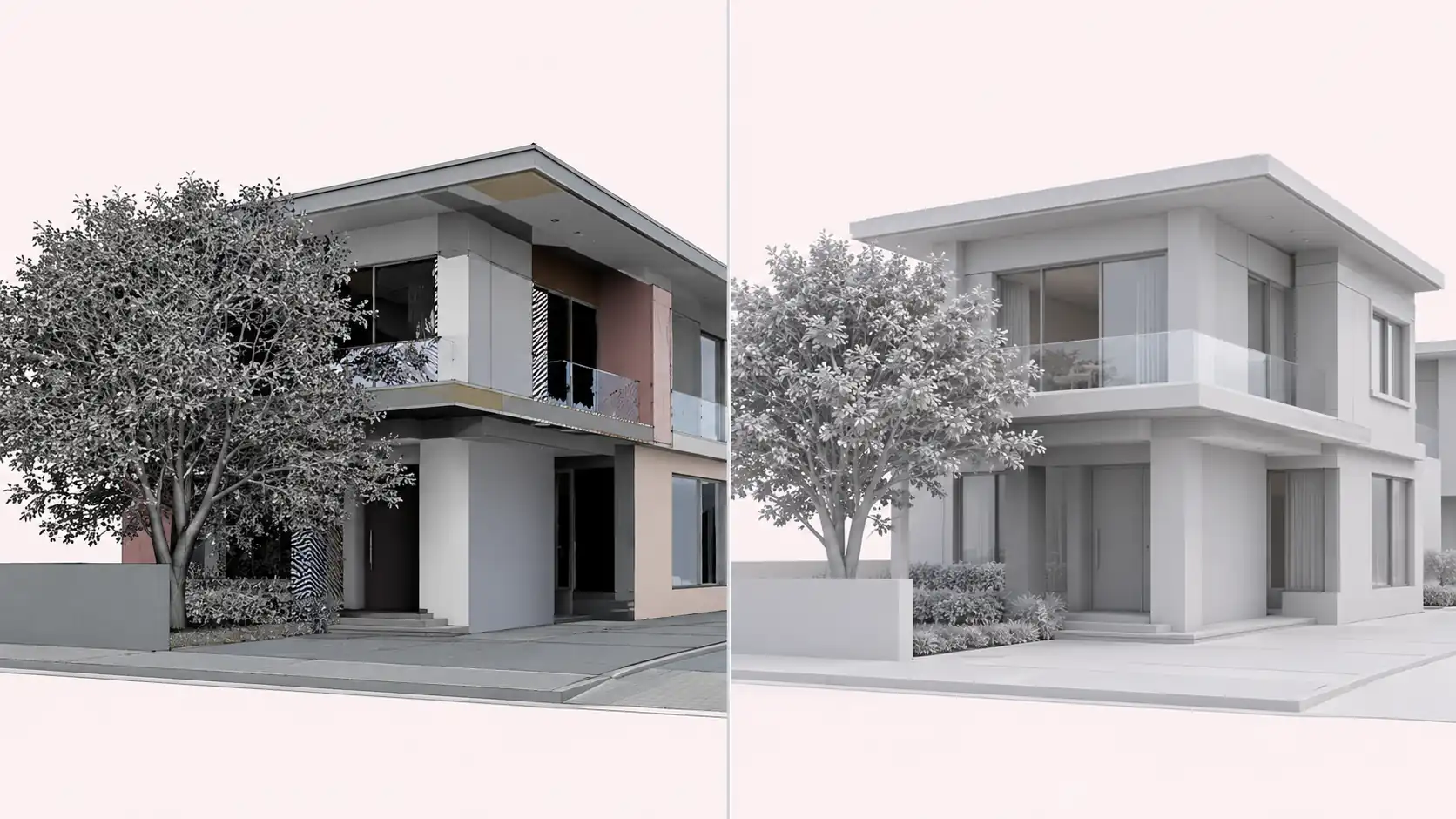
The cheapest fix is the ten-minute checklist above, run before the file is sent.
How to Find the Best 3D Modeling Partner for Architectural Models
Sometimes the right answer is not buying more software. If your team is at capacity, or the model needs to be rebuilt to marketing quality, a modeling and rendering partner can take it on. Look for these:
- Software match: they work natively in your formats (RVT, SKP, 3DM, IFC) and return files you can open and edit.
- Accuracy before polish: they model from your CAD or BIM drawings at real scale and show a clay render for approval before materials and lighting.
- Clean, reusable files: you get the model back organized by layer and material, ready for your own future views.
- A small test first: one scene or one view before a full project commitment.
- Clear revision and turnaround terms: what counts as a revision, what costs extra, and how fast changes come back, agreed in writing.
- Confidentiality: an NDA and white-label delivery if you present the work under your firm’s name.
For a deeper process, read how to vet an architectural visualization partner before you sign anything.
Learning Curve, What to Learn First and Hardware
Learning curve, easiest to hardest: SketchUp, Chief Architect, Shapr3D, Archicad, Vectorworks, Rhino, Revit, Blender, 3ds Max, Cinema 4D, Houdini. Revit and 3ds Max are not hard to start, but take the longest to master.
What to learn first for a US architecture job: Revit is the BIM skill offices ask for most, usually paired with SketchUp or Rhino for concepts. If the firms you want to join use Archicad or Vectorworks, learn that instead.
Hardware: a recent multi-core processor, 32 GB of RAM and a dedicated graphics card with at least 8 GB of video memory cover most architectural modeling. Rendering and real-time engines need more graphics memory, and Revit and 3ds Max require Windows.
Modeling vs Rendering vs AI: Where Each Fits
These three get mixed up, so it helps to separate them:
- Modeling builds the geometry: walls, openings, structure and form. Everything on this list does that.
- Rendering turns the model into a lit, textured image or animation, using engines such as V-Ray, Corona, Enscape or Cycles.
- AI rendering tools generate an image from a view, sketch or prompt. They are fast for early options, but they do not build models and can drift from your geometry.
AI does not replace modeling. You still need an accurate model for documents, coordination and any render that must match the drawings. For where AI images are safe to use, see our comparison of CGI vs AI rendering.
FAQ: 3D Modeling Software for Architecture
What is the best 3D modeling software for architecture?
It depends on the stage of work. SketchUp or Rhino suit concepts and massing, Revit, Archicad or Vectorworks suit BIM and construction documents, and 3ds Max or Blender suit visualization. Most firms use one BIM tool plus one concept or visualization tool.
Which 3D modeling software do most architects use in the US?
Revit is the most common BIM tool in US architecture offices, and SketchUp is the most common concept and interior modeler. Rhino is standard in design-led firms working with complex geometry.
Is there free 3D modeling software for architects?
Yes. Blender and FreeCAD are free for any use, including commercial work. SketchUp Free runs in a browser for non-commercial use, and Rhino offers a 90-day evaluation.
Is SketchUp or Revit better for architects?
They do different jobs. SketchUp is faster for concepts, interiors and client sessions. Revit is better for coordinated construction documents and consultant work. Many firms use SketchUp early and Revit for documentation.
Which 3D modeling software works best with V-Ray and Enscape?
SketchUp, Rhino and Revit all have V-Ray and Enscape plugins that run inside the modeling program. 3ds Max runs V-Ray natively and is the most common pipeline for photoreal marketing renders.
What file format should I send to a rendering studio?
Send the native file where possible (.skp, .3dm, .rvt, .blend or .max), or FBX as a universal option. Include PDF or DWG drawings, a material schedule and reference images.
Can I use Revit for photorealistic renders?
Revit’s built-in renderer is suited to quick checks, not client-facing images. For photoreal output, connect Enscape, Twinmotion or V-Ray, or export to 3ds Max or send the model to a rendering studio.
Which 3D modeling software runs on a Mac?
SketchUp, Rhino, Archicad, Vectorworks, Blender, Chief Architect, FreeCAD and Cinema 4D run on Mac. Revit and 3ds Max are Windows only.
Do architects need to learn more than one 3D modeling tool?
Usually two: one BIM tool for accurate documents (Revit, Archicad or Vectorworks) and one flexible tool for concepts or visuals (SketchUp, Rhino or Blender).
Get Your Model Render-Ready
The right 3D modeling software for architecture is the one that fits your stage of work and hands a clean model to whoever renders it. Choose your documentation tool for your consultants, your concept tool for your designers, and run the cleanup checklist before every handoff.
If your team needs the model built or rebuilt to production standard, our architectural 3D modeling services work from your CAD, BIM or PDF drawings, with a clay render for your approval before materials and lighting.
Ready to start? Send us your model and drawings to get a quote.